
KI-Beratung Beta

Gutscheinbedingungen

**Gültig am 20.11.2026 ab einem Mindestbestellwert von 30€ auf Spielzeug, Schreibwaren, Filme, Geschenke & Trends, Musik, tolino eReader & Zubehör, Hörbücher und Hörbuch-Downloads, nicht preisgebundene Bücher und Kalender online auf thalia.at und in der Thalia App. Einzelne Artikel können ausgeschlossen sein. Aufgrund der Buchpreisbindung sind deutschsprachige Bücher und eBooks ausgenommen. Zusätzlich ausgenommen sind Abos & Flatrates, Games, Geschenkkarten/-boxen, Shelfies, Software, Zeitschriften sowie einzelne Artikel von tonies®. Pro Einkauf einmal einlösbar. Click & Collect nur bei Onlinevorabzahlung möglich. Keine Barauszahlung. Nicht kombinierbar mit anderen Aktionen und Gutscheinen. Gutschein wird auf max. 500€ Bestellwert angerechnet. Nicht gültig für Versandkosten und Services. Preisgebundene Artikel sind vom Mindestbestellwert ausgeschlossen.

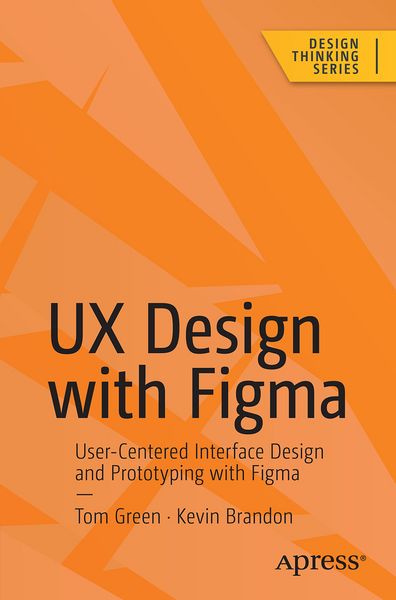
  • Produktbild: UX Design with Figma
  • Produktbild: UX Design with Figma
- 12%

UX Design with Figma User-Centered Interface Design and Prototyping with Figma

Aus der Reihe Design Thinking
12% sparen

47,99 € UVP 54,99 €

inkl. gesetzl. MwSt., Versandkostenfrei


Beschreibung

Maximize Figma’s arsenal of tools and plugins within a team-based collaborative environment and accelerate your company’s decision making. This book will show you where Figma fits into the user experience (UX) design process from documentation to developer handoff.

Since its release as a browser-based...

Beschreibung

Maximize Figma’s arsenal of tools and plugins within a team-based collaborative environment and accelerate your company’s decision making. This book will show you where Figma fits into the user experience (UX) design process from documentation to developer handoff.


Since its release as a browser-based design tool in 2016, Figma has fast become the de facto UX Design tool for the industry mainly due to its accessibility and ease of use. As you move through the book you will learn where Figma fits in the UX process. For example, using FigJam (an online whiteboard) for brainstorming, and creating interactive prototypes for mobile devices, tablets, and web sites. You’ll also see how Figma is used to create and integrate with design systems, and how variables, when applied to design system components, can accelerate the design and development workflow.


With the help of step-by-step examples, and using Figma’s tools and templates, you’ll create artifacts such as Flow and Journey diagrams, Personas, and wireframes. From there you will explore other design and interactivity features, and how to prepare a Figma file for handoff to a development team.


This book is your roadmap to utilizing Figma, the industry’s fastest growing collaborative design tool for building meaningful products. 


What You Will Learn


  • Create interactive prototypes

  • Test and submit designs for team review

  • Understand the collaborative workflow involved in an UX project

  • Prepare common UX documentation


Who This Book Is For


Designers, developers, and UX specialists with little-to-no Figma experience who are looking to integrate it within their workflows, and intermediate Figma users who are just starting to become involved in the collaborative UX workflow.


Produktdetails

Einband

Taschenbuch

Erscheinungsdatum

30.06.2024

Abbildungen

XXVI, 564 p. 383 illus., 357 illus. in color.

Verlag Apress

Produktdetails

Einband

Taschenbuch

Erscheinungsdatum

30.06.2024

Abbildungen

XXVI, 564 p. 383 illus., 357 illus. in color.

Verlag Apress
Seitenzahl

564

Maße (L/B/H)

23,5/15,5/3,2 cm

Gewicht

885 g

Auflage

1. Auflage

Sprache

Englisch

EAN

9798868803239

Herstelleradresse

Springer-Verlag GmbH
Tiergartenstr. 17
69121 Heidelberg
DE

Email: ProductSafety@springernature.com

Noch keine Bewertungen vorhanden

Verfassen Sie die erste Bewertung zu diesem Artikel

Helfen Sie anderen Kundinnen und Kunden durch Ihre Meinung.

Kundinnen und Kunden meinen

Bewertungen (0)

  • Produktbild: UX Design with Figma
  • Produktbild: UX Design with Figma

  • 1.The Figma Interface.- 2. Adding Content.- 3. Teams and Collaborative Projects.- 4. Creating UX Design Documentation.- 5. Building Low Fidelity Prototypes.- 6. Building Medium Fidelity Prototypes.- 7. Interactivity Fundamentals.- 8. Micro-Interactions in Figma.- 9. Design System Fundamentals.- 10. Building Content.- 11. Developer Handoff.