Gutscheinbedingungen

**Gültig bis 15.06.2026 auf Spiele & Spielzeug online auf thalia.at, in der Thalia App ab einem Mindestbestellwert von 30€ und in allen Thalia Buchhandlungen in Österreich. In den Buchhandlungen nur gültig auf lagernde Ware. Einzelne Artikel können ausgeschlossen sein. Ausgenommen sind preisgebundene Artikel sowie online auf thalia.at und in der Thalia App einzelne Artikel von tonies®. Pro Einkauf einmal einlösbar. Nur gültig gegen Vorlage oder im Onlineshop hinterlegter Bonuscard. Infos zur Einlösung in der Buchhandlung sind auf der Bonuscard-Vorteilspreisseite zu finden. Click & Collect nur bei Onlinevorabzahlung möglich. Keine Einlösung bei Scan & Go-Bezahlung. Keine Barauszahlung. Nicht kombinierbar mit anderen Aktionen und Gutscheinen. Gutschein wird auf max. 500€ Bestellwert angerechnet. Nicht gültig für Geschenkkarten, Versandkosten und Services.

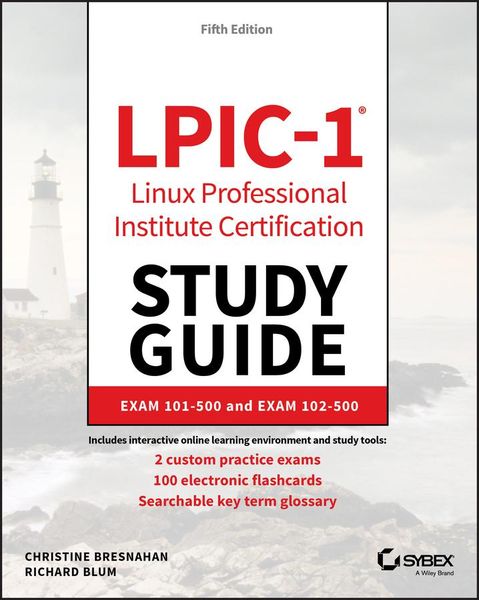
Produktbild: LPIC-1 Linux Professional Institute Certification Study Guide

LPIC-1 Linux Professional Institute Certification Study Guide Exam 101-500 and Exam 102-500

59,99 €

inkl. gesetzl. MwSt., Versandkostenfrei


Produktdetails

Einband

Taschenbuch

Erscheinungsdatum

02.12.2019

Verlag

Wiley

Seitenzahl

688

Maße (L/B/H)

23,3/18,7/4 cm

Gewicht

1163 g

Auflage

5. Auflage

Sprache

Englisch

ISBN

978-1-119-58212-0

Produktdetails

Einband

Taschenbuch

Erscheinungsdatum

02.12.2019

Verlag

Wiley

Seitenzahl

688

Maße (L/B/H)

23,3/18,7/4 cm

Gewicht

1163 g

Auflage

5. Auflage

Sprache

Englisch

ISBN

978-1-119-58212-0

Herstelleradresse

Libri GmbH
Europaallee 1
36244 Bad Hersfeld
DE

Email: gpsr@libri.de

Kundinnen und Kunden meinen

0 Bewertungen

Informationen zu Bewertungen

Zur Abgabe einer Bewertung ist eine Anmeldung im Konto notwendig. Die Authentizität der Bewertungen wird von uns nicht überprüft. Wir behalten uns vor, Bewertungstexte, die unseren Richtlinien widersprechen, entsprechend zu kürzen oder zu löschen.

Die Bewertungen sind nach Format, Anzahl Sterne und Datum sortiert.

Verfassen Sie die erste Bewertung zu diesem Artikel

Helfen Sie anderen Kund*innen durch Ihre Meinung

Kundinnen und Kunden meinen

0 Bewertungen filtern

Die Leseprobe wird geladen.
  • Produktbild: LPIC-1 Linux Professional Institute Certification Study Guide
  • Introduction xxi

    Assessment Test xxxix

    Part I Exam 101-500 1

    Chapter 1 Exploring Linux Command-Line Tools 3

    Understanding Command-Line Basics 4

    Discussing Distributions 4

    Reaching a Shell 5

    Exploring Your Linux Shell Options 5

    Using a Shell 7

    Using Environment Variables 11

    Getting Help 17

    Editing Text Files 20

    Looking at Text Editors 20

    Understanding vim Modes 24

    Exploring Basic Text-Editing Procedures 24

    Saving Changes 27

    Processing Text Using Filters 28

    File-Combining Commands 28

    File-Transforming Commands 31

    File-Formatting Commands 33

    File-Viewing Commands 36

    File-Summarizing Commands 40

    Using Regular Expressions 45

    Using grep 45

    Understanding Basic Regular Expressions 47

    Understanding Extended Regular Expressions 50

    Using Streams, Redirection, and Pipes 50

    Redirecting Input and Output 51

    Piping Data between Programs 55

    Using sed 56

    Generating Command Lines 60

    Summary 61

    Exam Essentials 61

    Review Questions 62

    Chapter 2 Managing Software and Processes 67

    Looking at Package Concepts 68

    Using RPM 69

    RPM Distributions and Conventions 69

    The rpm Command Set 71

    Extracting Data from RPMs 77

    Using YUM 78

    Using ZYpp 83

    Using Debian Packages 86

    Debian Package File Conventions 87

    The dpkg Command Set 87

    Looking at the APT Suite 92

    Using apt-cache 93

    Using apt-get 94

    Reconfiguring Packages 97

    Managing Shared Libraries 98

    Library Principles 98

    Locating Library Files 99

    Loading Dynamically 100

    Library Management Commands 100

    Managing Processes 102

    Examining Process Lists 102

    Employing Multiple Screens 109

    Understanding Foreground and Background Processes 116

    Managing Process Priorities 120

    Sending Signals to Processes 121

    Summary 126

    Exam Essentials 127

    Review Questions 129

    Chapter 3 Configuring Hardware 133

    Configuring the Firmware and Core Hardware 134

    Understanding the Role of Firmware 134

    Device Interfaces 136

    The /dev Directory 138

    The /proc Directory 139

    The /sys Directory 143

    Working with Devices 144

    Hardware Modules 148

    Storage Basics 154

    Types of Drives 154

    Drive Partitions 155

    Automatic Drive Detection 155

    Storage Alternatives 156

    Multipath 156

    Logical Volume Manager 157

    Using RAID Technology 158

    Partitioning Tools 158

    Working with fdisk 158

    Working with gdisk 161

    The GNU parted Command 162

    Graphical Tools 163

    Understanding Filesystems 164

    The Virtual Directory 164

    Maneuvering Around the Filesystem 166

    Formatting Filesystems 167

    Common Filesystem Types 167

    Creating Filesystems 169

    Mounting Filesystems 170

    Manually Mounting Devices 170

    Automatically Mounting Devices 172

    Managing Filesystems 173

    Retrieving Filesystem Stats 173

    Filesystem Tools 173

    Summary 174

    Exam Essentials 175

    Review Questions 177

    Chapter 4 Managing Files 181

    Using File Management Commands 182

    Naming and Listing Files 182

    Exploring Wildcard Expansion Rules 186

    Understanding the File Commands 189

    Compressing File Commands 199

    Archiving File Commands 202

    Managing Links 213

    Managing File Ownership 218

    Assessing File Ownership 219

    Changing a File's Owner 219

    Changing a File's Group 220

    Controlling Access to Files 221

    Understanding Permissions 221

    Changing a File's Mode 223

    Setting the Default Mode 226

    Changing Special Access Modes 228

    Locating Files 229

    Getting to Know the FHS 229

    Employing Tools to Locate Files 231

    Summary 239

    Exam Essentials 239

    Review Questions 241

    Chapter 5 Booting, Initializing, and Virtualizing Linux 245

    Understanding the Boot Process 246

    The Boot Process 246

    Extracting Information about the Boot Process 247

    Looking at Firmware 249

    The BIOS Startup 249

    The UEFI Startup 250

    Looking at Boot Loaders 251

    Boot Loader Principles 251

    Using GRUB Legacy as the Boot Loader 251

    Using GRUB 2 as the Boot Loader 255

    Adding Kernel Boot Parameters 259

    Using Alternative Boot Loaders 260

    The Initialization Process 261

    Using the systemd Initialization Process 262

    Exploring Unit Files 263

    Focusing on Service Unit Files 265

    Focusing on Target Unit Files 268

    Looking at systemctl 270

    Examining Special systemd Commands 273

    Using the SysV Initialization Process 276

    Understanding Runlevels 277

    Investigating SysVinit Commands 280

    Stopping the System 283

    Notifying the Users 284

    Virtualizing Linux 286

    Looking at Virtual Machines 287

    Understanding Containers 291

    Looking at Infrastructure as a Service 293

    Summary 295

    Exam Essentials 295

    Review Questions 298

    Part II Exam 102-500 303

    Chapter 6 Configuring the GUI, Localization, and Printing 305

    Understanding the GUI 306

    Understanding the X11 Architecture 307

    Examining X.Org 308

    Figuring Out Wayland 309

    Managing the GUI 311

    Standard GUI Features 311

    The X GUI Login System 313

    Common Linux Desktop Environments 314

    Providing Accessibility 323

    Using X11 for Remote Access 325

    Remote X11 Connections 326

    Tunneling your X11 Connection 326

    Using Remote Desktop Software 328

    Viewing VNC 328

    Grasping Xrdp 330

    Exploring NX 332

    Studying SPICE 332

    Understanding Localization 333

    Character Sets 333

    Environment Variables 334

    Setting Your Locale 335

    Installation Locale Decisions 335

    Changing Your Locale 336

    Looking at Time 338

    Working with Time Zones 338

    Setting the Time and Date 339

    Configuring Printing 343

    Summary 345

    Exam Essentials 346

    Review Questions 348

    Chapter 7 Administering the System 353

    Managing Users and Groups 354

    Understanding Users and Groups 354

    Configuring User Accounts 355

    Configuring Groups 371

    Managing Email 375

    Understanding Email 375

    Choosing Email Software 376

    Working with Email 377

    Using Log and Journal Files 384

    Examining the syslog Protocol 385

    Viewing the History of Linux Logging 387

    Logging Basics Using rsyslogd 387

    Journaling with systemd-journaldd 394

    Maintaining the System Time 403

    Understanding Linux Time Concepts 403

    Viewing and Setting Time 404

    Understanding the Network Time Protocol 408

    Using the NTP Daemon 411

    Using the chrony Daemon 413

    Summary 416

    Exam Essentials 416

    Review Questions 419

    Chapter 8 Configuring Basic Networking 423

    Networking Basics 424

    The Physical Layer 424

    The Network Layer 426

    The Transport Layer 430

    The Application Layer 431

    Configuring Network Features 433

    Network Configuration Files 433

    Graphical Tools 436

    Command-Line Tools 438

    Getting Network Settings Automatically 445

    Bonding Network Cards 445

    Basic Network Troubleshooting 447

    Sending Test Packets 447

    Tracing Routes 448

    Finding Host Information 449

    Advanced Network Troubleshooting 452

    The netstat  Command 452

    Examining Sockets 455

    The netcat Utility 456

    Summary 457

    Exam Essentials 458

    Review Questions 460

    Chapter 9 Writing Scripts 465

    Shell Variables 466

    Global Environment Variables 466

    Local Environment Variables 468

    Setting Local Environment Variables 470

    Setting Global Environment Variables 472

    Locating System Environment Variables 472

    Using Command Aliases 474

    The Basics of Shell Scripting 475

    Running Multiple Commands 475

    Redirecting Output 476

    Piping Data 477

    The Shell Script Format 478

    Running the Shell Script 479

    Advanced Shell Scripting 481

    Displaying Messages 481

    Using Variables in Scripts 482

    Command-Line Arguments 484

    Getting User Input 484

    The Exit Status 488

    Writing Script Programs 489

    Command Substitution 489

    Performing Math 490

    Logic Statements 492

    Loops 496

    Functions 498

    Running Scripts in Background Mode 500

    Running in the Background 501

    Running Multiple Background Jobs 502

    Running Scripts Without a Console 503

    Sending Signals 504

    Interrupting a Process 504

    Pausing a Process 504

    Job Control 506

    Viewing Jobs 506

    Restarting Stopped Jobs 508

    Running Like Clockwork 509

    Scheduling a Job Using the at Command 509

    Scheduling Regular Scripts 513

    Summary 515

    Exam Essentials 516

    Review Questions 518

    Chapter 10 Securing Your System 523

    Administering Network Security 524

    Disabling Unused Services 524

    Using Super Server Restrictions 534

    Restricting via TCP Wrappers 538

    Administering Local Security 539

    Securing Passwords 539

    Limiting root Access 543

    Auditing User Access 547

    Setting Login, Process, and Memory Limits 549

    Locating SUID/SGID Files 551

    Exploring Cryptography Concepts 553

    Discovering Key Concepts 553

    Securing Data 554

    Signing Transmissions 555

    Looking at SSH 555

    Exploring Basic SSH Concepts 555

    Configuring SSH 558

    Generating SSH Keys 560

    Authenticating with SSH Keys 561

    Authenticating with the Authentication Agent 564

    Tunneling 565

    Using SSH Securely 567

    Using GPG 567

    Generating Keys 568

    Importing Keys 569

    Encrypting and Decrypting Data 570

    Signing Messages and Verifying Signatures 571

    Revoking a Key 573

    Summary 574

    Exam Essentials 575

    Review Questions 577

    Appendix Answers to Review Questions 583

    Chapter 1: Exploring Linux Command-Line Tools 584

    Chapter 2: Managing Software and Processes 587

    Chapter 3: Configuring Hardware 590

    Chapter 4: Managing Files 593

    Chapter 5: Booting, Initializing, and Virtualizing Linux 597

    Chapter 6: Configuring the GUI, Localization, and Printing 601

    Chapter 7: Administering the System 605

    Chapter 8: Configuring Basic Networking 608

    Chapter 9: Writing Scripts 611

    Chapter 10: Securing Your System 615

    Index 619